/Read & Listen
Guide · 6 min read

Read & listen.

What you'll do
One login covers ebooks, audiobooks, and podcasts. All from a single shelf at read.elishalucero.com. Install the right app for your phone, sign in, and every book syncs to wherever you are.
00
The pitch

What is this?

AudioBookshelf is a home library for everything printed or spoken. Same idea as Plex, different content. One app, three shelves:

  • Audiobooks
    Streamable or downloadable. Bookmarks, speed control, sleep timer.
  • Ebooks
    Read in-browser or push to your Kindle with two taps.
  • Podcasts
    Subscribe to anything. Episodes queue automatically.
i
Heads up. ABS uses its own login, separate from Plex. If you already have a Plex account for Moonrock, that's not the same as a read.elishalucero.com account. You need both.
01
Step one · 30 seconds

Get a login.

There's no self-signup. Text Elisha two things:

  1. 01The username you want (no spaces, no fuss).
  2. 02An email address so she can DM you the temporary password.
Tip. If you already have a username for Plex, reuse it. Makes your future self happy.
02
Step two · pick your device

Install the app.

The server URL is the same everywhere: https://read.elishalucero.com. Pick your device:

iPhone & iPad · use Plappa

The official AudioBookshelf app exists on iOS but is notably flaky. Plappa is the third-party client Elisha recommends. Same login, much better polish.

  1. 01Install Plappa from the App Store.
  2. 02Open it. When prompted for a server, enter https://read.elishalucero.com.
  3. 03Sign in with the username + password Elisha sent you. (It's not your Plex account; ABS has its own logins.)
  4. 04Your library shows up. Tap a book to stream. The little cloud icon downloads it for offline listening.
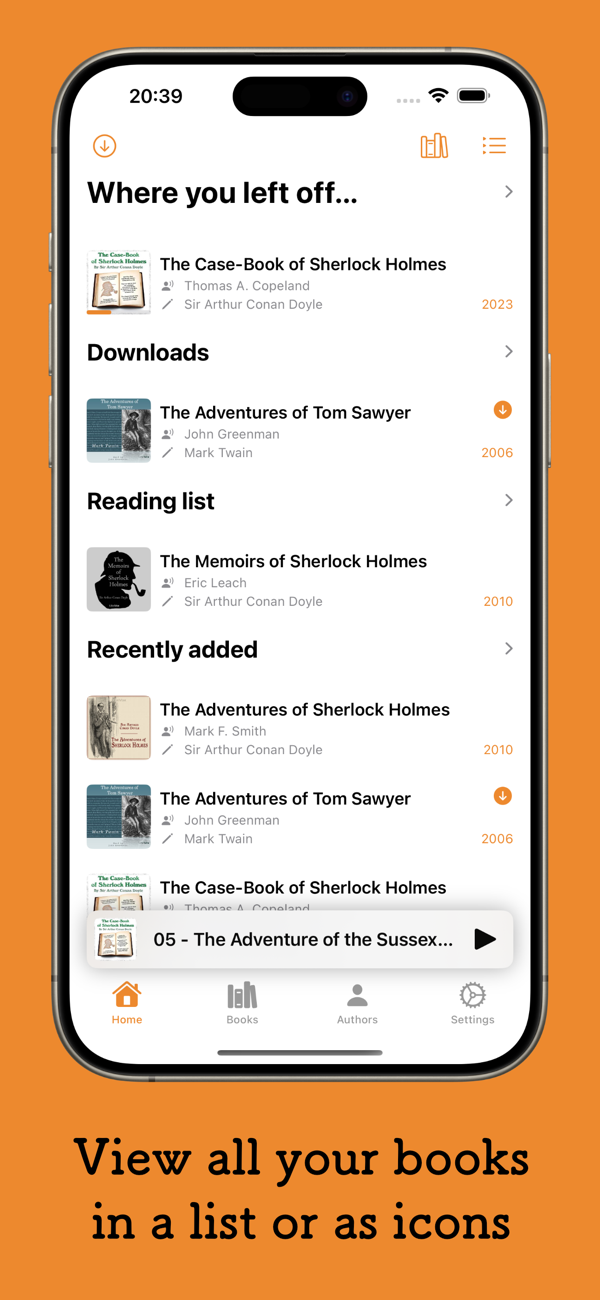
Plappa iOS app · home
iphone / ipadsource: apps.apple.com
03
Step three · forever

Sync across devices.

Progress, bookmarks, and finished-status all sync server-side. You do nothing. Four things worth knowing on day one:

Download before you fly. Tap the cloud icon on any book to save it locally. Offline playback on planes, subway, cabins with no signal. The app uploads your progress once you're back online.
Set playback speed. Long books at 1.0× is a punishment. Plappa, the Android app, and the web player all support up to 3.5× with no pitch shift.
Sleep timer. Every app has one. Useful for falling asleep to a book without waking up forty chapters ahead.
Send to Kindle. Pair your ABS account with your Kindle's send-to-Kindle email once (see the Kindle tab above). After that, any ebook pushes to your device in under a minute.
04
If things go sideways

Trouble shooting.

Most problems are login confusion or offline downloads not completing. Check the common ones below before texting.

I don't have a login yet.+
ABS accounts are separate from Plex. Text Elisha the username you want; she'll create it and send a temporary password you can change.
How does Goodreads sync work?+
Friend Elisha on Goodreads (goodreads.com). Whatever you add to your Want-to-Read shelf (or any custom shelf you share with her) gets pulled into Moonrock's queue. New books usually land on the server within a day.
How do I request a book or audiobook?+
Easiest path: add it to a shelf on Goodreads (see above). If you want something faster, text Elisha directly, or drop it in the Discord #requests channel. The /request bot is Plex-only; it doesn't do books.
Plappa crashed / won't connect.+
First: force-quit and reopen. Second: check the server URL is exactly https://read.elishalucero.com with the https, no trailing slash. Third: clear the app and reinstall. It's the fix 9 times out of 10.
Audio cuts out in the car.+
CarPlay works with Plappa; Android Auto works with the official app. If it drops, the fix is almost always to download the book to your device first rather than streaming it over LTE.
Can I bookmark where I am?+
Yes, and it syncs across devices. Listen on your phone walking the dog, pick up on the web on your laptop at the same spot. Nothing to configure.
Still stuck? Text Elisha. Or drop into the Discord. There's no pride in figuring it out alone.
Quick reference
Which app?
iOS: Plappa (third-party, but better).
Android: AudioBookshelf (official).
Add a book

Friend Elisha on Goodreads. Anything you drop onto a shelf there shows up here within a day.

How requests work →
Sync everywhere

Your place in the book, bookmarks, and finished-status sync server- side. Listen on the phone, pick up on the web at the same spot.